SimDB technical design
Introduction
This document summarises the design of the IMAS simulation management system (SimDB) as is organised as follows:
Supported platforms
High level description of the system and API design
Overview of the CLI functionality
Design of the metadata elements
Outline of simulation data validation
Supported Platforms
The following platforms are support for SimDB: Linux, macOS, Windows.
High level description
The system will have two major components: one local to the user, and the other remote.
The local component will be provided as a Command Line Interface (CLI) tool, similar to tools such as git or openssl.
script <command> <command specific options and passed parameters>
The commands will be divided into a hierarchical tree of commands, with each level of commands having their own help available, i.e.:
script <command> --help
script <command> <sub_command> --help
The remote component will manage the reference database and associated metadata. Interactions between the two components will be through a REST API, using SSL encrypted HTTP (HTTPS).
Architecture overview
The following images shows the high-level components of the system.
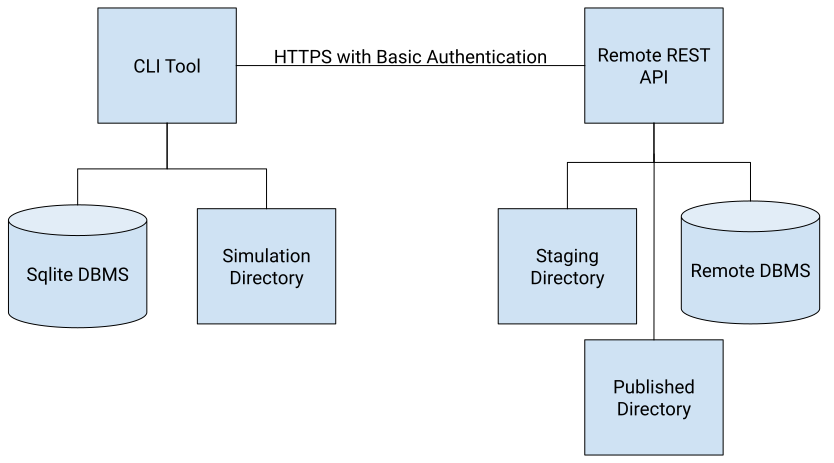
A description of the components is as follows:
The CLI tool: Used to manage the simulation metadata, file manifest and provenance and to allow the user to query these elements.
The SQLite DBMS: To store the user ingested simulations before they have been pushed to the remote system.
The Simulation Directory: The directory where the simulation has been run and where the simulation files will be retrieved from when they are pushed to the remote system.
The Remote REST API: The remote API which processes requests from the user CLI to receive pushed simulations and store them ready for validation and publishing.
The Staging Directory: The location the pushed simulation files are transferred to while waiting for validation.
The Remote DBMS: The DBMS where the simulation metadata and provenance will be saved for all uploaded simulation along with their validation status flags.
Assumptions
Interactions between the CLI and the Remote central database
Are Stateless
May not use a permanent network connection
Will be based on a Simulation Identifier (a UUID)
Will utilise a temporary directory for all exchanged objects
Use a directory named as the UUID
Moved on simulation COMMIT to a permanent directory
Authentication and authorisation will be needed for each interaction on the remote database
The Provenance database may use a different DBMS
DAG based schema
Triple is two nodes, and a connected edge
The schema can be written as standard SQL statements
CLI functionality
The following functionality will be provided by the CLI tool.
Database Query
Query the user’s local database
CLI text input with context
Query the remote central database
CLI text input with context
Query Output
Text written to command line formatted as YAML
User command line redirection to output file
Request a Simulation UUID
CLI request with context
context=[alias]
Output written to command line
File Manifest
Simulation Data Files
Simulation Plan, Input files, Output files
Location
Class (Plan, Input, Output, Metadata, Provenance, …)
Hash checksum
Data Import
Set of Simulation Data Files
Metadata file
Provenance file
Data Export
Set of Simulation Data Files
Metadata file
Provenance file
Data Import/Export
A JSON transport object containing all simulation data including simulation plan, metadata, provenance, etc.
Binary IO streams sent via HTTP for each simulation file
Input files
Output files
IMAS API log file
UDA log file
Log Files
IMAS API Log
Ordered list of all IMAS low level API calls
UDA Data Access Log
Ordered list of all UDA data access and ingest calls
Metadata
Metadata file
Name value pairs compliant with Dublin Core
YAML format
Ingested into the CLI SQLite DBMS
Exchanged between local and remote system as part of the JSON transport object
Provenance SQLite database file
Preferably W3C PROV (RDF) triples, otherwise name value pairs
Collected by future provenance instrumentation within IMAS and written to a user SQLite database
Ingested by the CLI SQLite DBMS
File Formats
Manifest
YAML Ascii file
Metadata
Name value pairs
YAML Ascii file
One pair per record
Provenance
YAML Ascii file
Simulation Plan
Microsoft Word or Adobe PDF
Simulation Input
Ascii
Binary: IDS
Simulation Output
Binary: IDS
Configuration file
Ascii
Name value pairs
Git diff and status file
Ascii
IMAS API Log
CSV Ascii
UDA Log
CSV Ascii
IMAS Open/Create arguments
Name value pairs
Use case narratives and system processing actions
Prepare for a new simulation
Execute the simulation
Register the simulation locally using the imasdb CLI
Deposit the simulation remotely using the imasdb CLI
Contents of the metadata file proforma
The proforma file contains the value descriptions. Text lines beginning # are ignored. Names without values are not ingested.
Name |
Value description |
|---|---|
Title |
The name given to the resource. |
Subject |
The topic of the content of the resource. |
Description |
An account of the content of the resource. |
Type |
The nature or genre of the content of the resource. |
Source |
A Reference to a resource from which the present resource is derived - in whole or part. |
Relation |
A reference to a related resource. |
Coverage |
The extent or scope of the content of the resource. |
Creator |
An entity primarily responsible for making the content of the resource. |
Publisher |
The entity responsible for making the resource available. |
Contributor |
An entity (name) responsible for making contributions to the content of the resource. Examples of a Contributor include a person, an organization or a service. |
Rights |
Information about rights held in and over the resource. If the rights element is absent, no assumptions can be made about rights with respect to the resource. |
Date |
A date associated with an event in the life cycle of the resource. Typically, Date will be associated with the creation or availability of the resource. Recommended best practice for encoding the date value is defined in ISO 8601 and follows the YYYY-MM-DD format. |
Format |
The physical or digital manifestation of the resource. Typically, Format may include the media-type. |
Identifier |
An unambiguous reference to the resource within a given context. |
Language |
A language of the intellectual content of the resource. |
Audience |
A class of entity for whom the resource is intended or useful. A class of entity may be determined by the creator or the publisher or by a third party. |
Provenance |
A statement of any changes in ownership and custody of the resource since its creation that are significant for its authenticity, integrity and interpretation. The statement may include a description of any changes successive custodians made to the resource. |
RightsHolder |
A person or organization owning or managing rights over the resource. Recommended best practice is to use the URI or name of the Rights Holder to indicate the entity. |
InstructionalMethod |
A process, used to engender knowledge, attitudes and skills, that the resource is designed to support. Instructional Method will typically include ways of presenting instructional materials or conducting instructional activities, patterns of learner-to-learner and learner-to-instructor interactions, and mechanisms by which group and individual levels of learning are measured. Instructional methods include all aspects of the instruction and learning processes from planning and implementation through evaluation and feedback. |
AccrualMethod |
The method by which items are added to a collection. Recommended best practice is to use a value from a controlled vocabulary. |
AccrualPeriodicity |
The frequency with which items are added to a collection. Recommended best practice is to use a value from a controlled vocabulary. |
AccrualPolicy |
The policy governing the addition of items to a collection. Recommended best practice is to use a value from a controlled vocabulary. |
DC element qualifiers
Qualifier elements are terms that extend or refine the original Dublin Core Metadata Element Set. They are associated with an original element.
There are two broad classes of qualifiers:
Element Refinement - make the meaning of an element narrower or more specific.
Encoding Scheme - these qualifiers identify schemes that aid in the interpretation of an element value. These schemes include controlled vocabularies and formal notations or parsing rules. A value expressed using an encoding scheme will thus be a token selected from a controlled vocabulary, or a string formatted in accordance with a formal notation.
DC Element |
Element Refinement Qualifier |
Element Encoding Scheme |
|---|---|---|
Title |
Alternative |
|
Creator |
||
Subject |
||
Description |
Abstract |
|
Publisher |
||
Contributor |
||
Date |
Created |
DCMI Period |
Type |
||
Format |
Extent |
|
Identifier |
BibliographicCitation |
|
Source |
||
Language |
ISO 639-2RFC 3066 |
|
Relation |
Is Version Of |
|
Coverage |
Spatial |
DCMI Period |
Rights |
AccessRights |
|
Audience |
Mediator |
|
Provenance |
||
RightsHolder |
||
InstructionalMethod |
||
AccrualMethod |
||
AccrualPeriodicity |
Simulation Validation Testing
Testing cannot verify the accuracy of simulation results. It can however test that data complies with certain expectations: value range, value distribution, and value deviation from standard reference data. The results of testing can become a resource to be utilised in locating simulation data: the results become classifiers that are recorded in a relational database that may be queried by users and applications.
If an IDS has been populated with data, there are several data quantities that must be assigned values: the ids_properties and code structures. Additionally, if ids_properties/homogeneous_time is set to the value 1, the array time must be filled with values other than the missing value.
Data that originates from pre-existing IDS files and are used as inputs to the workflow model needs not be tested as they are not the results of the workflow. However, these need to be identified (whole IDS objects and specific individual IDS data entities) to the validation testing routines, so they can be skipped over. It is simpler to identify only the specific IDS objects that need be tested.
Initialisation
To help assist in the generation of test comparison data, the application will have a start-up mode where the tests are not run; instead the statistics data are recorded. These can then be utilised to form the initial set of test comparison data.
Start-up data may be written to a temporary SQL database table for analysis and aggregation. From this an appropriate set of comparison statistics may be generated.
Additional test parameters that will need to be set are the check on missing values, and the check on mandatory data fields.
# |
Test |
Description |
|---|---|---|
1 |
Verify all data are within expected limits. |
1. Compare statistics drawn from the data against a standard set: Mean, Max, Min, Standard Deviation. |
2 |
Compare all data with reference data. The reference data may be data for a different occurrence number contained in the same data file. |
All data entities within the IDSs to be validated are compared with the same IDS data entities from a reference dataset. |